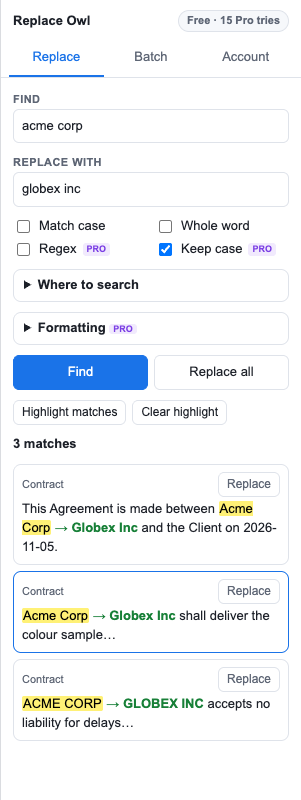
See every match before you change it. Replace across all tabs, headers and footnotes, keep capitalisation and formatting, and run whole style guides in one click.
Works only inside the document you open it in. Never stores your text.
Built for editors, legal and localisation teams, writers and anyone who maintains long documents.
See each match in context with the replacement next to it. Click to jump there, replace one by one or all at once.
Search the whole document, not just the body of the current tab. Pro
Replace “acme” with “globex” and get “Globex” and “GLOBEX” where they belong. Pro
Patterns with capture groups: turn 2026-11-05 into 05.11.2026 everywhere. Pro
Find only bold or highlighted text, and make replacements bold, highlighted or coloured. Original formatting is kept. Pro
Save rule lists (UK → US spelling, product renames, style guides) and run them in one click. Paste straight from a spreadsheet. Pro
Basic find, preview and replace are free forever. Try every Pro feature 15 times before deciding.
Payments are handled by Polar, our merchant of record, which takes care of sales tax and VAT. Your license key arrives by email straight away.
Only the document you open it in (the “current document only” permission), plus the ability to show its sidebar and to contact our license server. It can't see your other files or your Google Drive.
Yes. Use File → Version history in Google Docs to restore any earlier version. For big changes, use the preview first: every match is listed before anything changes.
Yes. New text takes the formatting of the text it replaces, unless you choose to make it bold, highlighted or coloured.
Yes. By default it searches the tab you're in. Pro can search every tab, including nested ones, plus headers, footers and footnotes.
After purchase you'll get a license key by email. Open Replace Owl, go to Account, paste the key and click Activate.
If Pro doesn't work for you, email us within 14 days of purchase for a full refund.